
HSBC Priority Payments Format
Configuration Requirements
Please read Bank Payments before you download a test or live file from Aqilla.
Please contact your account manager, consultant or Aqilla Support if you want to use this format.
Entities involved
The following entities are involved, using HSBC terminology:
-
Debtor (payer, sender) - a Company record in Aqilla
-
Debtor Address - the same Company in Aqilla
-
Debtor Bank Account - a Bank Account Details record associated with a Payment Account in Aqilla
-
Debtor Agent (payer’s bank) - the same record
-
Debtor Agent’s Address - the same record
-
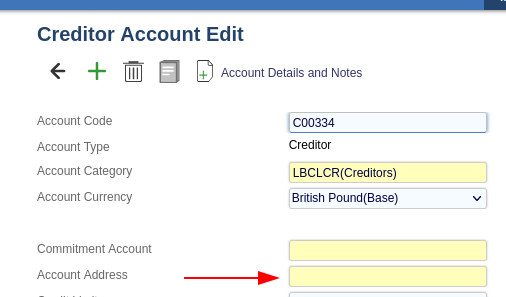
Creditor (payee, beneficiary) - a Supplier record selected as “Address” in Creditor Account
-
Creditor Address - the same Supplier record
-
Creditor Bank Account - Creditor Account record in Aqilla
-
Creditor Agent - the same record in Aqilla
-
Creditor Agent’s Address - the same record in Aqilla
Addresses
In Creditor and Debtor addresses, Address Line 1, Town, Country and either Country Sub-Division or Postcode, or both, must be populated.
HSBC requires that the country is entered using two-letter ISO codes. For the UK, the ISO code is GB.
Since Aqilla does not have a dedicated field for ISO currency codes, when generating a file, the following steps are performed:
-
If the length of the value of the Country field is 2, output the value as is without further validation.
-
Otherwise, if the value is blank, or “UK”, or “United Kingdom”, output “GB”.
-
Otherwise fail validation.
Bank Account Numbers
IBAN and BIC must be entered everywhere instead of usual Bank Account Number and Sort Code.
Company
Street Name (Line 1), Town (Line 3), Country Sub-Division (Line 4), Country and Postcode must be entered.

Company Bank Account
-
“Originator Identification Number” field must be populated with what HSBC calls “ABC ID”: ABCxxxxxxxx
-
Bank Account Number / IBAN: IBAN must be entered
-
Bank Sort Code / BIC: BIC must be entered
-
Bank Account Name must be filled
-
Bank Branch is ignored!
Creditor Address
An Address (Supplier’s) must be linked to Creditor Accounts. The same fields needs to be populated as in the Company.
Creditor Bank Details
-
Bank Account Number / IBAN: IBAN must be entered
-
Bank Sort Code / BIC: BIC must be entered
-
Bank Account Name must be filled
-
Bank Branch / Country: if left blank, or the value is “UK” or “United Kingdom”, it is automatically replaced by “GB” in the file. Otherwise Country Code must be entered, which will be validated for being a valid ISO code.